
Connect Claude MCP to Machbase Neo and Work with Data Using AI
Development has begun on MCP support that connects Claude with Machbase Neo. In this article, we show how to use MCP with Machbase Neo through Claude Desktop and share some of the results.
This is still a beta exploring different possibilities, and version 0.1 may have limitations. The project is open source; please report questions or suggestions through the GitHub issue tracker.
Introducing Claude
Claude is an AI assistant developed by Anthropic for text generation, analysis, coding, creative work, and more. Anthropic is one of the major AI providers, alongside OpenAI and Google with Gemini. MCP (Model Context Protocol) is an open standard developed by Anthropic that enables secure connections between AI models and external data sources.
Today, we will connect Claude’s MCP capabilities to Machbase Neo and work with data using natural language. For a preview, watch the YouTube video below.
MCP environment overview
To keep this walkthrough easy to test and follow, we use Windows.
We assume that a recent version of Machbase Neo is already installed.
If you need installation instructions, see the following guide.
Operating system: Windows 11
Machbase Neo: v8.0.55 for Windows (earlier versions can also be used)
AI assistant: Claude
MCP repository: https://github.com/machbase/machbase-mcp-server
Preparing the Machbase Neo data hub
With Neo already installed, we will use a dataset from the AI Data Hub to prepare test data easily.
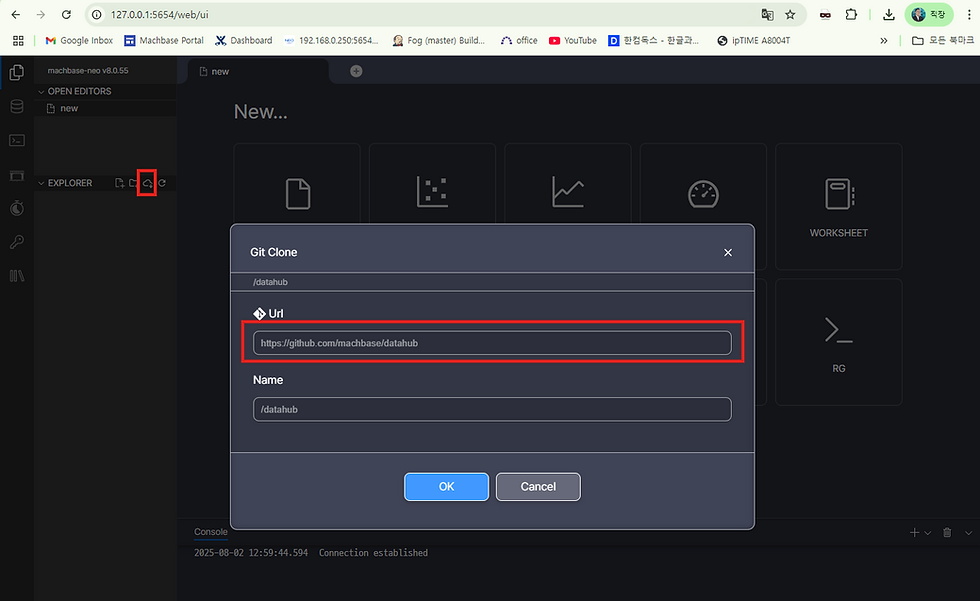
Click the area marked in red on the left of Neo to import data from GitHub. In the dialog that appears, enter the Machbase AI Data Hub URL, https://github.com/machbase/datahub, and click OK.
Once this completes, a datahub folder appears on the left, as shown below.

Loading appliance energy consumption and related data
We will load the Appliances Energy dataset, listed under June 2025 in the image below, and use it through MCP. With only about 550,000 records, it is convenient for testing. See the linked article for more detail on data processing and AI applications.

Place the cursor on “create tag...” on the left and click Play to create the appliance_energy table. If it is not created, make sure the cursor is on line 2; click that line to move it there.
Then scroll down and click the Play button under Data Loading. The data loads quickly.
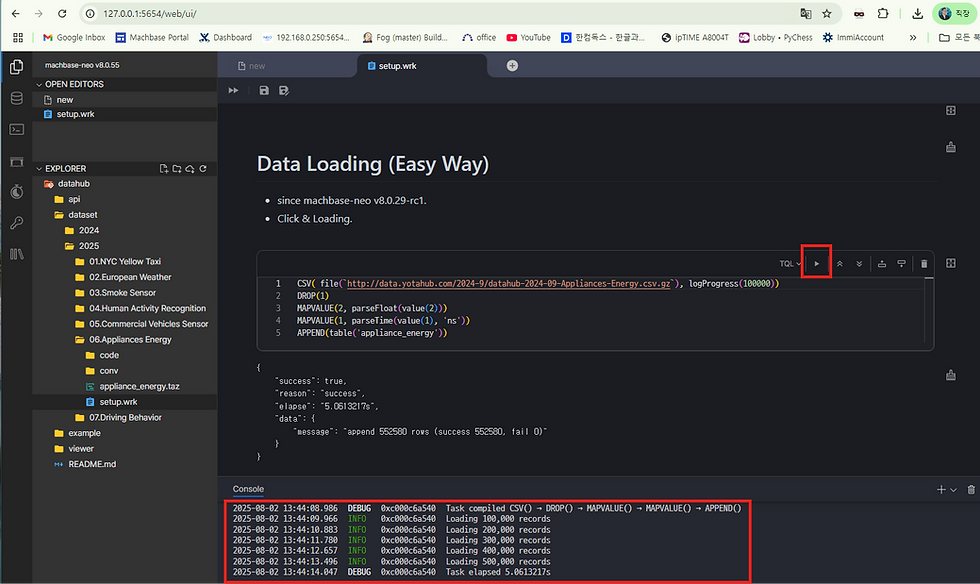
As shown above, approximately 550,000 records were inserted in just five seconds.
Installing Claude Desktop for MCP
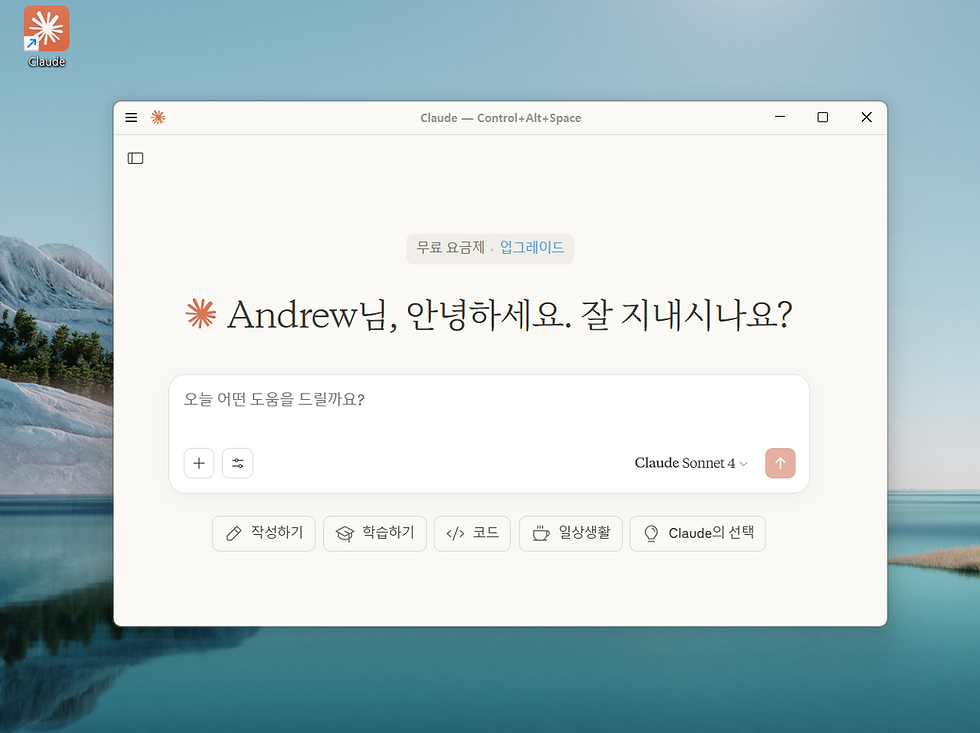
Visit https://claude.ai/download and install the Windows application.

After installation, launch the application to see it running on Windows as shown below. If you use the free tier, avoid using too much of your allowance on questions before beginning the test.
Installing MCP support for Machbase Neo
Download the source code for Machbase Neo’s MCP server from https://github.com/machbase/machbase-mcp-server.
After extracting the archive, you will find the files shown below.
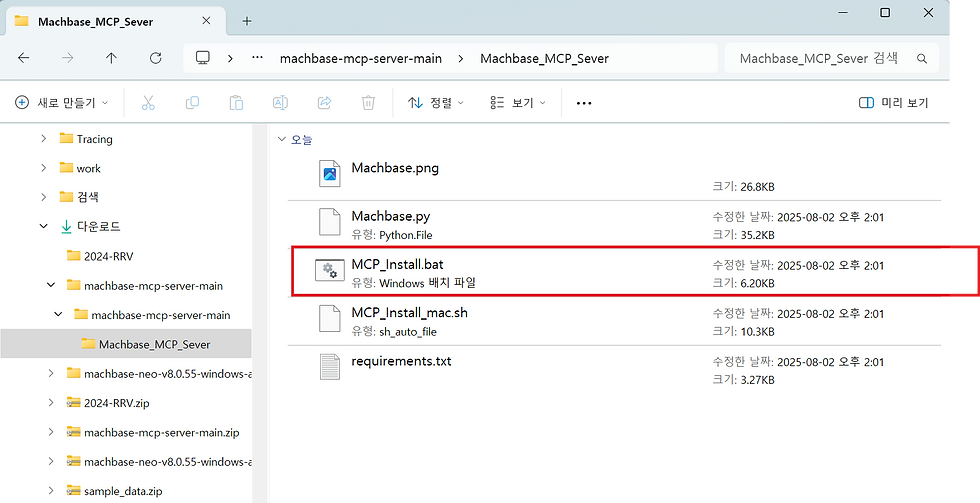
Run the batch file. If the environment is installed automatically as shown below, the process is working correctly.
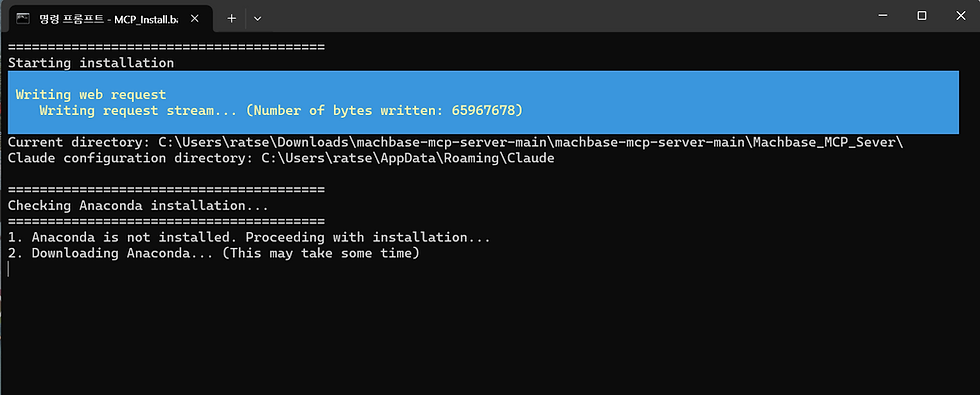
When the final screen appears as shown below, installation is complete and MCP is ready to use.

Restarting Claude Desktop
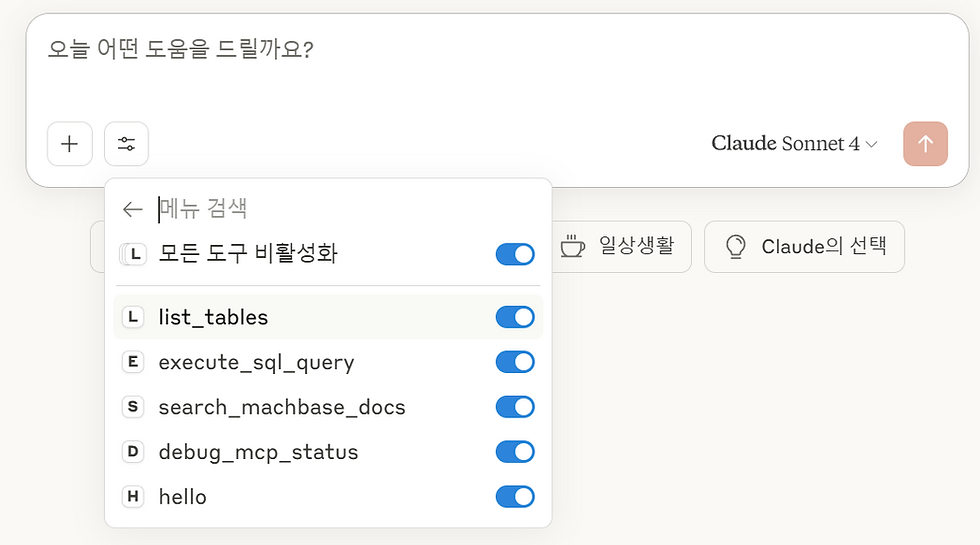
Claude Desktop continues running in the background, so fully exit it and launch it again. If Machbase appears when you open “Search and tools,” installation was successful!

Click the machbase menu to see the available options, as shown below.
Using Machbase Neo data through MCP
Now it is time to work with the data in Machbase. Even without knowing SQL, we can extract and analyze data—and create charts.
Listing tables

Along with APPLIANCE_ENERGY, the table we created earlier, Claude finds internal tables, metadata tables, and even automatically generated rollup tables.
Inspecting the APPLIANCE_ENERGY table
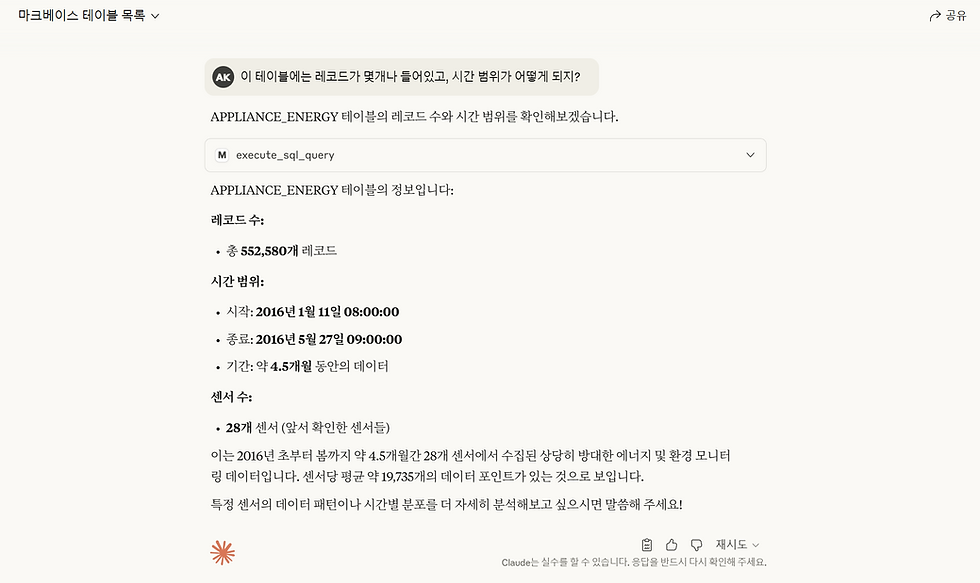
Even without a detailed explanation of the table, Claude recognizes that it contains energy and environmental monitoring data.
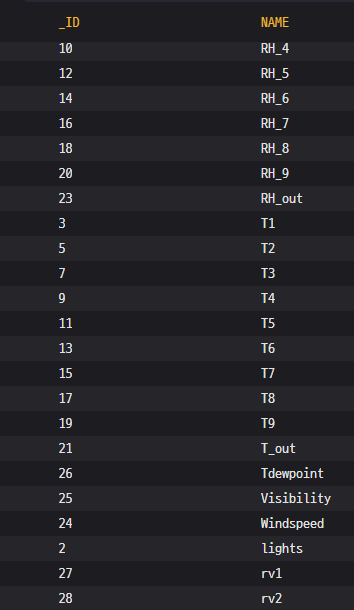
Listing tags
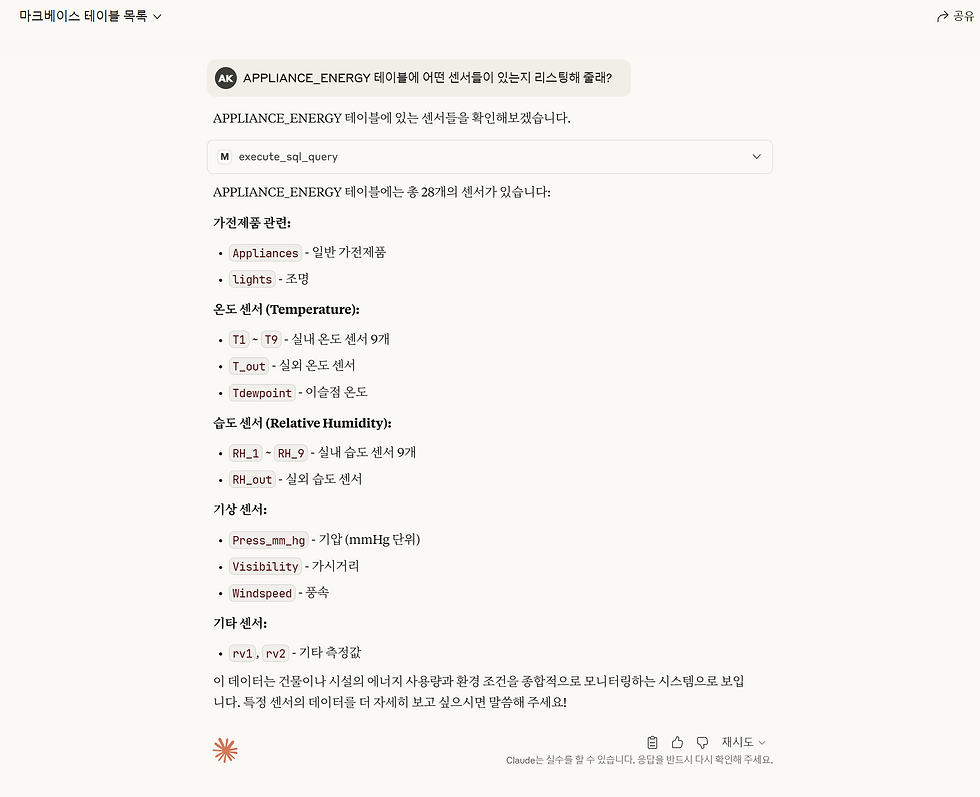
This result surprised me. The database contains only the tag names shown below, without information explaining their specific roles. It is interesting to consider where Claude obtained those descriptions.
Drawing a simple chart
When asked to draw a chart for the lights sensor, Claude produces the following result.
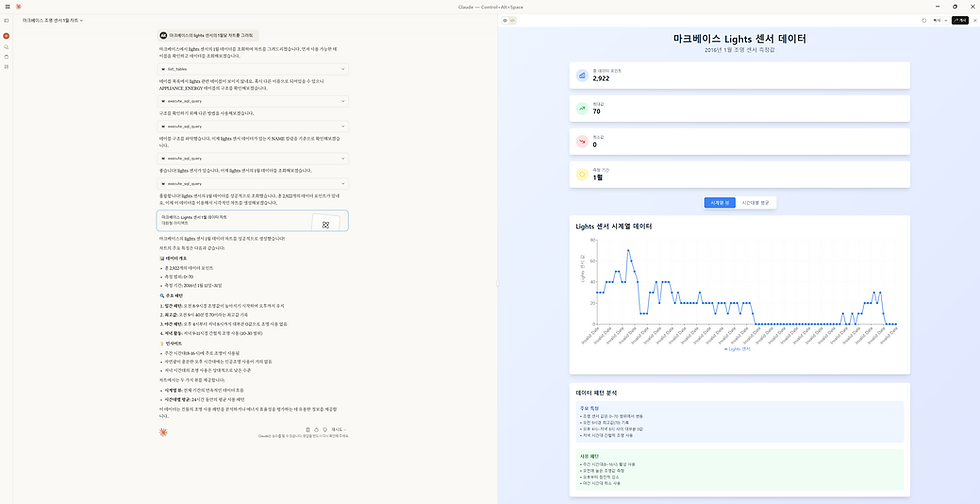
The current Machbase MCP implementation is not yet optimized, so Claude made several attempts to extract the data. It ultimately created the chart on the right and provided a brief analysis as well.
Asking for an analysis of the lights sensor data
I asked, “Can you find and analyze anomalies in the overall lights data pattern?” Claude returned the analysis shown below.
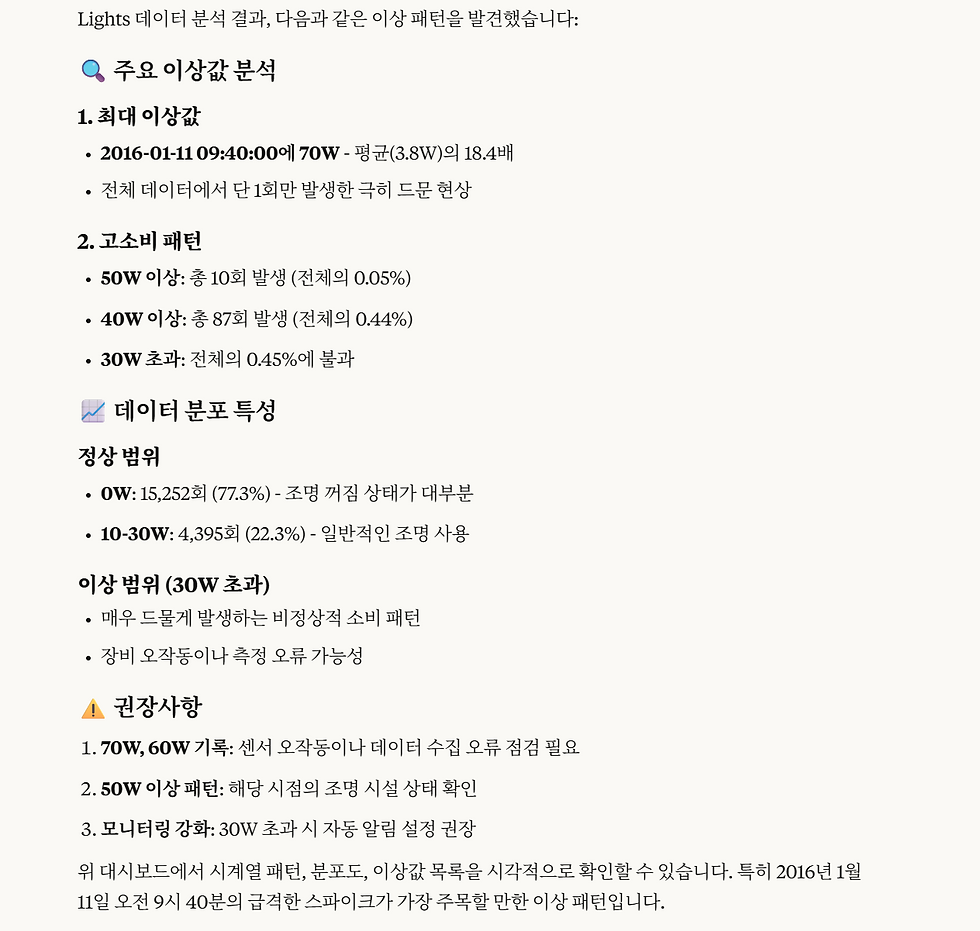

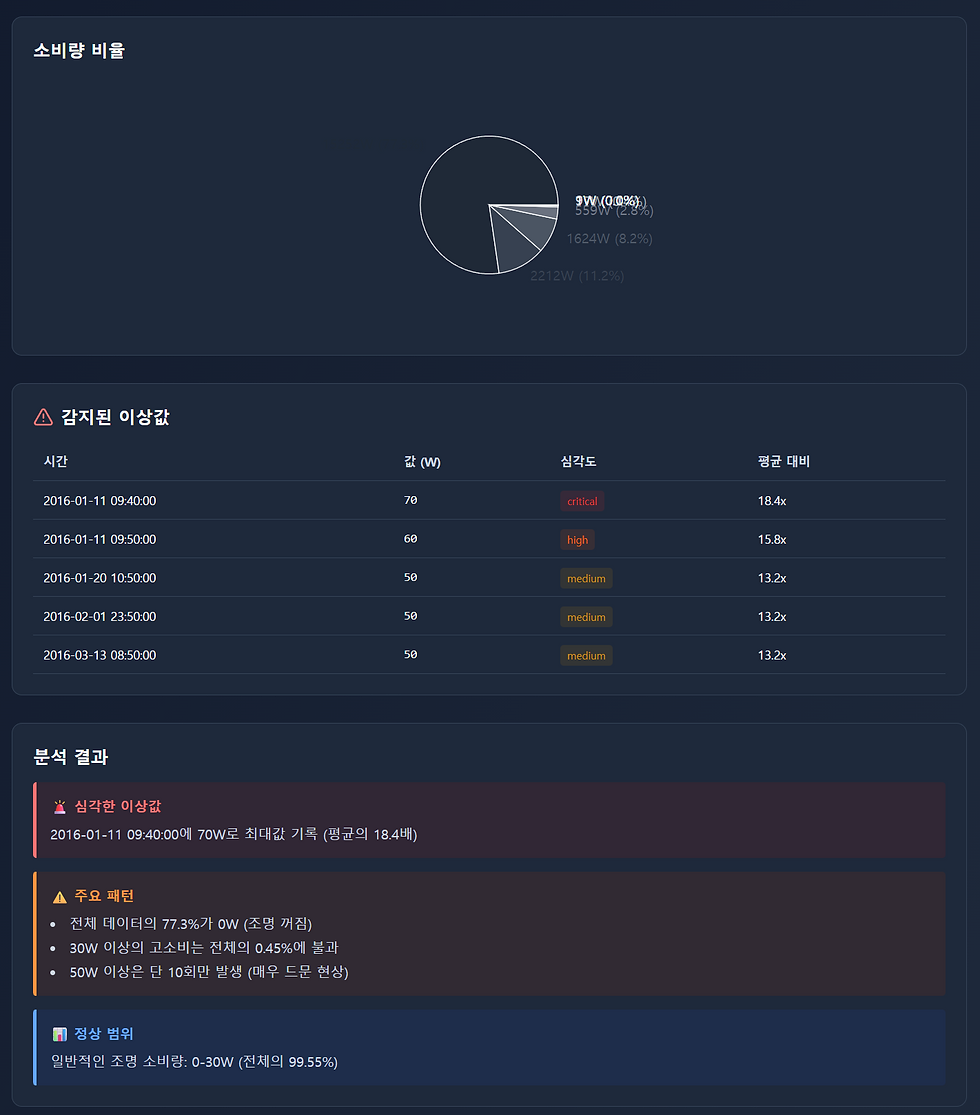
This is the analysis Claude produced. It felt like discovering a new way of working with data. There was also plenty of trial and error that is not shown here.
Limitations of Machbase MCP
This post focuses on the essentials, so it cannot cover every issue or limitation encountered during testing. The main areas for improvement when using Claude through Machbase MCP are summarized below.
Limited knowledge of Machbase SQL syntax — Claude does not know every part of Machbase’s SQL syntax. We need to consider how to provide prompts in advance for common data extraction patterns.
The need for RAG — At present, we provide Machbase Neo information indirectly by asking Claude to look up specific URLs for a topic. We need to explore how to provide relevant context more directly.
Analysis methodology — Beyond the general request to “analyze,” MCP should incorporate techniques and problem patterns that customers actually need in their work.
Future MCP development plans
This example uses Claude, but integration with OpenAI, Gemini, in-house small language models, and environments such as Ollama and LM Studio is also important. A local LLM fine-tuned for Machbase could be another useful approach to accurate, fast data extraction and analysis.
Improve prompts and SQL examples optimized for Machbase
Complete version 1.0 of the Claude-focused MCP implementation
Provide universal MCP support for ChatGPT, Gemini, and Grok
Support local LLMs through Ollama, LM Studio, and similar tools
Integrate with a range of capable LLM products developed in Korea
Much remains in development, and the future is uncertain. As always, Machbase plans to grow alongside advances in AI.
Closing thoughts
As the saying goes, a journey of a thousand miles begins with a single step. Machbase’s R&D team is still exploring LLM integration and the future shape of the product. As this article shows, innovative technologies and business models are already approaching the data-processing world, including DBMSs.
Machbase will continue evolving beyond the database, working with AI to create products for this new era.
Thank you.

![[Edge Computing Series #3] The Architecture of Micro Data Lakes](https://static.wixstatic.com/media/adc7e5_c3774374c53f40f1a91e40fbc60eaee1~mv2.png/v1/fill/w_980,h_550,al_c,q_90,usm_0.66_1.00_0.01,enc_avif,quality_auto/adc7e5_c3774374c53f40f1a91e40fbc60eaee1~mv2.png)
![[Smart Factory Basics #1] ISA-95: An International Framework](https://static.wixstatic.com/media/adc7e5_5764c89cc04c4e519e58381466cc64fa~mv2.jpg/v1/fill/w_501,h_373,al_c,q_80,enc_avif,quality_auto/adc7e5_5764c89cc04c4e519e58381466cc64fa~mv2.jpg)


